I work as an Applied Scientist building deployable AI systems — mostly server-side, with real GPU infrastructure. But I've been spending time outside of work exploring what it actually takes to run a useful LLM entirely on a phone, with no server involved. There are use cases where sending data to a cloud endpoint is either unacceptable or impractical, and I wanted to understand the real constraints firsthand rather than read about them.
This post covers how I quantized Qwen2.5-1.5B-Instruct to INT4 using Microsoft Olive and deployed it on iOS using ONNX Runtime GenAI and Flutter — including the specific quantization choices that matter for output quality at this model size, what the resulting model looks like, and how I wired it into a Flutter chat interface connected to the Whisper ASR pipeline I described in the previous post.
Why Qwen2.5-1.5B-Instruct
The constraints for on-device LLM inference on iOS are narrow:
- Must fit in device RAM. iPhones cap app memory at around 4-6 GB depending on the device. A 1B-3B parameter model is the practical range for CPU inference without memory pressure crashes.
- Must follow instructions reliably. A model that ignores the system prompt or generates repetitive garbage after a few sentences is not useful.
- Must handle structured tasks. Summarization, extraction, Q&A — the model needs enough instruction-following capability to be directed precisely.
Qwen2.5-1.5B-Instruct from Alibaba stood out in my testing. At 1.5B parameters it's at the smaller end of practically useful instruction-following models, but Qwen2.5 was trained on a larger and more diverse dataset than earlier models at this size. It also uses grouped query attention (GQA) with only 2 KV heads, which substantially reduces the KV cache memory footprint during inference — important on a device with limited RAM.
The Quantization Pipeline: Microsoft Olive
Microsoft Olive is an optimization toolkit built specifically for ONNX Runtime deployment. Rather than requiring you to chain quantization tools manually, Olive takes a declarative config file and runs a full optimization pipeline. For Qwen2.5-1.5B, my config is:
{
    "input_model": {
        "type": "HfModel",
        "model_path": "Qwen/Qwen2.5-1.5B-Instruct"
    },
    "systems": {
        "local_system": {
            "type": "LocalSystem",
            "accelerators": [
                { "execution_providers": ["CPUExecutionProvider"] }
            ]
        }
    },
    "passes": {
        "s": {
            "type": "SelectiveMixedPrecision",
            "algorithm": "k_quant_down"
        },
        "m": {
            "type": "ModelBuilder",
            "precision": "int4"
        }
    },
    "evaluate_input_model": false,
    "target": "local_system",
    "output_dir": "outputs/qwen2.5-1.5b_cpu_int4",
    "cache_dir": "cache",
    "no_artifacts": true
}
Two passes run in sequence:
SelectiveMixedPrecision with k_quant_down: This identifies which layers are sensitive to aggressive quantization and assigns them higher precision. The k_quant_down algorithm is specifically designed for LLMs — it protects the layers that have the largest impact on output quality: the embedding layer, the language model head, and the first and last few MLP down-projection layers. Everything else gets INT4.
ModelBuilder: Converts the model to ONNX format with the mixed-precision quantization applied and generates the genai_config.json that ONNX Runtime GenAI needs to manage KV cache, attention, and token generation.
Running the pipeline:
pip install olive-ai[cpu] transformers
olive run --config configs/qwen2.5-1.5b_rtn_int4.json
On a Mac, this takes about 15-20 minutes for the first run. Olive caches intermediate results, so subsequent runs with the same model weights are fast — the log shows it loading model artifacts from cache in under a second.
The Mixed-Precision Architecture in Practice
The model_config.json that Olive outputs tells you exactly what precision each layer received. Looking at the full output for my Qwen2.5-1.5B quantization, the architecture is:
- Default: INT4 for all layers
- INT8 overrides for:
lm_head(the output projection to vocabulary)model.embed_tokens(token embeddings)model.layers.0.mlp.down_projthrough a selection of MLP down-projections at layers 0, 1, 2, 3, 5, 8, 11, 14, 17, 20, 23, 25, 26, 27
This selection is not arbitrary. The embedding and LM head layers are the direct interface between the model and the token vocabulary — quantizing them aggressively introduces errors that cascade through every generated token. The MLP down-projection layers at both the early and late transformer blocks are where the residual stream is most sensitive to numerical precision; aggressive quantization there shows up as incoherent outputs.
The k_quant_down algorithm identified these layers empirically through a gradient-free sensitivity analysis. The result is a model that's mostly INT4 (fast and small) but has INT8 precision where it matters most for output quality.
The final model:
| File | Size |
|---|---|
model.onnx | 221 KB (graph structure only) |
model.onnx.data | 1.9 GB (all weight tensors) |
The 1.9 GB for a 1.5B parameter INT4 model is worth explaining. Pure INT4 at 0.5 bytes per parameter would be ~750 MB. The overhead comes from the INT8 layers (2x the storage of INT4), quantization scale factors stored per block, attention biases and normalization parameters kept in FP16/FP32, and the ONNX external data format's storage structure. 1.9 GB on disk is what you actually get with a mixed-precision model that's designed to run correctly, not just be small.
Model Architecture Details
The config.json output gives the full Qwen2.5-1.5B architecture:
vocab_size: 151,936
hidden_size: 1,536
num_hidden_layers: 28
num_attention_heads: 12
num_key_value_heads: 2  ← GQA, 6:1 ratio
intermediate_size: 8,960
max_position_embeddings: 32,768
RoPE theta: 1,000,000
activation: SiLU
The num_key_value_heads: 2 with 12 attention heads is a 6:1 GQA ratio. At inference time, the KV cache for 28 layers with 2 KV heads and 128 head dimensions is much smaller than it would be with full multi-head attention — this is what makes it practical to maintain long context on a device with limited RAM.
The 32,768 position embedding context is larger than most on-device use cases need, but the GenAI runtime handles this gracefully — the actual KV cache allocation scales with the actual sequence length, not the maximum.
Dart Integration: flutter_onnxruntime_genai
The flutter_onnxruntime_genai pub package wraps the ONNX Runtime GenAI C++ library for Flutter. It ships prebuilt XCFramework binaries for iOS, so there's no Xcode build step needed for the native layer. I wrap it in a service class that handles model initialization, KV cache management, and the Qwen2.5 chat template:
class PhiInsightService {
  static const int _maxLength = 1024;
  static const double _temperature = 0.3;
  static const double _topP = 0.9;

  String? _modelDir;

  Future<void> initialize(String modelDir) async {
    if (_modelDir != null) return;
    final exists = await File('$modelDir/genai_config.json').exists();
    if (!exists) throw StateError('Model not found at $modelDir');
    _modelDir = modelDir;
  }

  Future<InsightResult> generate(String prompt, {String? systemPrompt}) async {
    final sys = (systemPrompt ?? _defaultSystemPrompt) + _safetyNote;
    final formatted = _formatPrompt(system: sys, user: prompt);
    final timer = Stopwatch()..start();

    final text = await Isolate.run(() => ogaGenerateText(
      modelPath: _modelDir!,
      prompt: formatted,
      maxLength: _maxLength,
      temperature: _temperature,
      topP: _topP,
    ));

    timer.stop();
    return InsightResult(text: text, inferenceMs: timer.elapsedMilliseconds);
  }
}
All generation runs in a background Isolate — ONNX Runtime GenAI inference blocks for the full generation duration, so running it on the main isolate would freeze the UI completely.
The Qwen2.5 Chat Template
Qwen2.5-Instruct uses a specific chat template. Getting this wrong produces a model that ignores the system prompt, continues generating past where it should stop, or produces poorly formatted output. The template is documented in the model's chat_template.jinja file:
String _formatPrompt({required String system, required String user}) =>
    '<|im_start|>system\n$system<|im_end|>\n'
    '<|im_start|>user\n$user<|im_end|>\n'
    '<|im_start|>assistant\n';
For multi-turn conversations — maintaining the full history of a user's questions and the model's responses — I format the entire conversation at each call:
Future<InsightResult> generateFromHistory(
  List<({String role, String content})> messages, {
  String? systemPrompt,
}) async {
  final sys = (systemPrompt ?? _defaultSystemPrompt) + _safetyNote;
  final buf = StringBuffer();
  buf.write('<|im_start|>system\n$sys<|im_end|>\n');
  for (final msg in messages) {
    buf.write('<|im_start|>${msg.role}\n${msg.content}<|im_end|>\n');
  }
  buf.write('<|im_start|>assistant\n');

  // Run inference with full formatted history
}
This gives the model full context over the conversation — it can refer back to earlier messages and build on previous responses across turns.
System Prompting and Task-Specific Methods
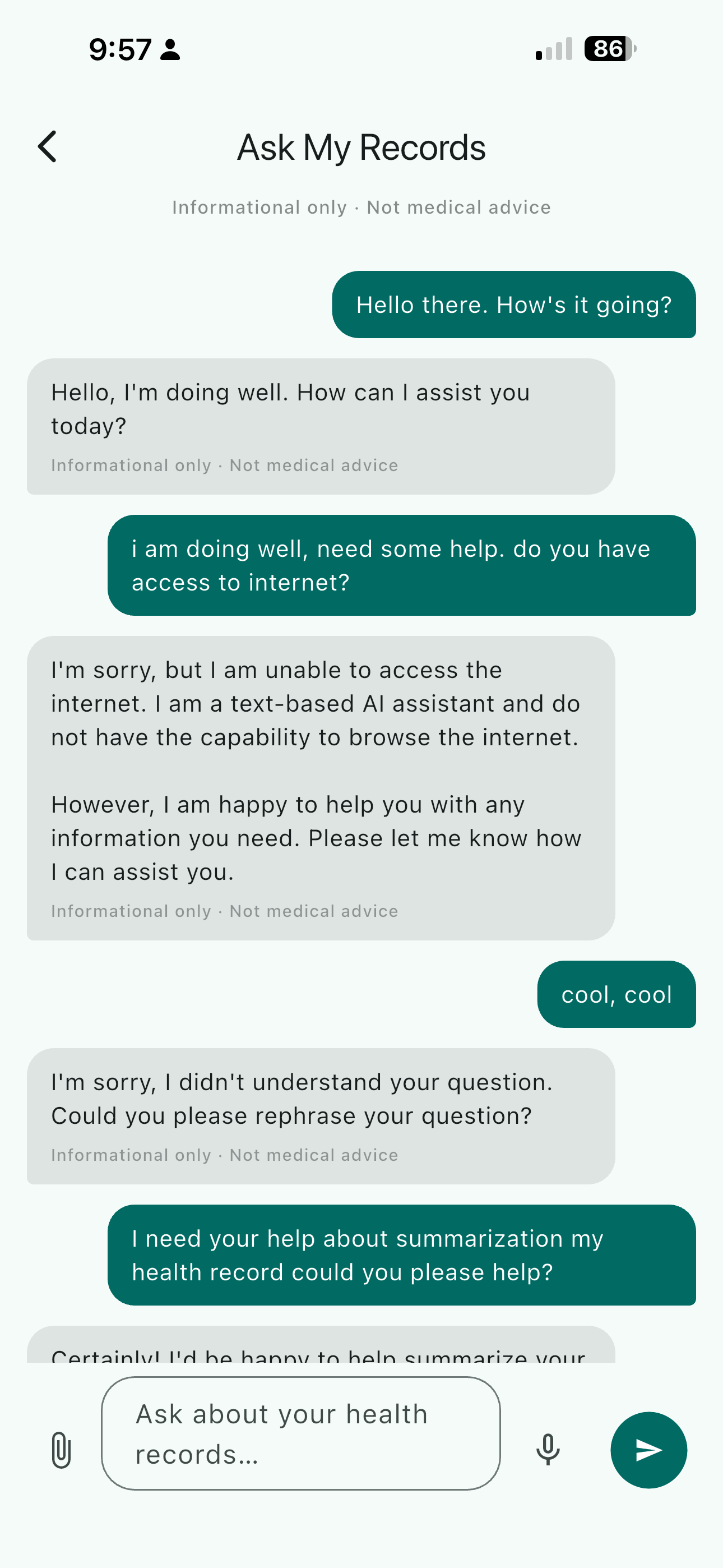
The system prompt does most of the work in shaping the model's behavior. As a demonstration, I built a health records assistant — one example of a task where on-device processing makes a lot of sense. The model helps explain and summarize without overstepping into diagnosis:
static const String _defaultSystemPrompt =
    'You are a helpful personal health records assistant. '
    'You help users understand their own medical records, lab results, '
    'prescriptions, and health history in plain language. '
    'You summarise, explain, and identify trends but never diagnose or '
    'prescribe. You always recommend consulting a qualified healthcare '
    'provider for medical decisions.';
That boundary — explain and summarize, but never diagnose — is achievable with a 1.5B model when the system prompt is explicit. I also built task-specific convenience methods that encode precise instructions for each use case:
Future<InsightResult> summarizeRecord(String recordText) => generate(
  'Please summarise the following health record in plain language. '
  'Extract and highlight: key findings, dates, provider, medications '
  'or dosages mentioned, and any notable values.\n\nRecord:\n$recordText',
);

Future<InsightResult> explainLabResult(String labText) => generate(
  'Explain what these lab results mean in plain language. '
  'Note whether each value is within the typical reference range and '
  'what the result generally indicates. Do not diagnose.\n\n$labText',
);
Smaller models benefit more from precise prompts than larger ones — there's less room for the model to recover from an ambiguous instruction. The healthcare framing here is one example; the same pattern applies to any domain where the task is well-defined and latency tolerance is moderate.
The Voice-to-LLM Pipeline
The Whisper ASR pipeline from the previous post feeds directly into this LLM. The full flow:
- User taps the mic button in the chat interface
- Audio streams to a WAV file via the
recordFlutter plugin - User stops recording
- Whisper Base INT8 transcribes the audio — partial tokens stream into the input field as the decoder runs
- The transcription is sent to Qwen2.5-1.5B INT4
- The response streams character by character into the chat
The streaming on the LLM side is simulated — ONNX Runtime GenAI generates the full response before returning it, so I chunk the text and yield it progressively:
Stream<String> generateStream(String prompt, {String? systemPrompt, int chunkSize = 6}) async* {
  final result = await generate(prompt, systemPrompt: systemPrompt);
  final buf = StringBuffer();
  for (final ch in result.text.split('')) {
    buf.write(ch);
    if (buf.length >= chunkSize) {
      yield buf.toString();
      buf.clear();
    }
  }
  if (buf.isNotEmpty) yield buf.toString();
}
True token-level streaming from ONNX Runtime GenAI is possible with its streaming callback API, but the simulated version produces a visually identical result with less engineering complexity — the right trade-off for a prototype.
On-Device Performance Reality
I want to be honest about what "on-device LLM" means in practice on current hardware.
On an iPhone 14 running Qwen2.5-1.5B INT4:
- Time to first token: ~3-5 seconds (model loading from disk + prompt encoding)
- Generation speed: ~5-8 tokens per second
- A 200-token response: 25-40 seconds
That is slow by cloud standards. It's usable when the interaction model accommodates it — a question that takes 20-30 seconds to answer is fine for some tasks, not for others. The token streaming helps: the user starts reading within a few seconds rather than staring at a blank screen.
The cold start cost is the other friction point. I warm the model during app startup so it's ready before the user reaches the chat interface. On a server with GPU acceleration, the same model would respond in under a second. On-device CPU inference is slower — that's simply the current state of the hardware.
Model Provisioning: Getting 1.9 GB onto the Device
The model can't be bundled in the Flutter app — 1.9 GB is too large for a standard app distribution. The practical approach is an on-demand download on first launch:
- A setup screen prompts the user to download the model (~1.9 GB) to device storage
- Files are saved to the application support directory
- A
genai_config.jsonexistence check gates the model-dependent UI
static Future<bool> modelDownloaded(String dir) async {
  return File('$dir/genai_config.json').exists();
}
Once downloaded, the model works fully offline — no API keys, no network required.
Where This Is Useful
On-device LLM inference at this scale is genuinely practical for tasks where latency tolerance is moderate and privacy matters. Healthcare is one compelling example — summarizing a lab result, explaining a prescription, or helping a patient prepare questions for a provider visit doesn't need to happen on a cloud server, and there are real reasons not to want it to. The project I built here could have different applications beyond healthcare: legal documents, personal notes, offline-first productivity tools, or any situation where you want local language understanding without an internet dependency.
The hardware story is improving. ONNX Runtime GenAI's CoreML EP support is progressing, and Apple Neural Engine acceleration for quantized LLMs would change the performance picture substantially. For now, 5-8 tokens per second on CPU is the baseline. It's enough to ship something useful.